Feel Free To Search.....

Google
 

Wellcum!!!

Wellcum To All My Dear Readers! If this site is too boring then poke into ' My Other 'Unrated' site' Where u can find all my 'juicy' & educational' pokeing posts! Not suitable for kids & 'innocence' ladies! He! He! If u find no new pst in this site it meant I am busy posting on 'My Other 'Unrated' site' !

Tuesday, February 24, 2009

Have Hope! Things Don't Turn Out It Should Be!

Two traveling angels stopped to spend the night in the home of a wealthy family. The family was rude and refused to let the angels stay in the mansion's guest room. Instead the angels were given a small space in the cold basement. As they made their bed on the hard floor, the older angel saw a hole in the wall and repaired it.

When the younger angel asked why, the older angel replied,

"Things aren't always what they seem."

The next night the pair came to rest at the house of a very poor, but very hospitable farmer and his wife. After sharing what little food they had the couple let the angels sleep in their bed where they could have a good night's rest. When the sun came up the next morning the angels found the farmer and his wife in tears. Their only cow, whose milk had been their sole income, lay dead in the field. The younger angel was infuriated and asked the older angel how could you have let this happen? The first man had everything, yet you helped him, she accused. The second family had little but was willing to share everything, and you let the cow die.

"Things aren't always what they seem," the older angel replied.

"When we stayed in the basement of the mansion, I noticed there was gold stored in that hole in the wall.Since the owner was so obsessed with greed and unwilling to share his good fortune, I sealed the wall so he wouldn't find it."

"Then last night as we slept in the farmer’s bed, the angel of death came for his wife. I gave him the cow instead.Things aren't always what they seem."

Sometimes that is exactly what happens when things don't turn out the way they should. If you have faith, you just need to trust that every outcome is always to your advantage. You just might not know it until sometime later...

Tomorrow a mystery.

Today is a gift.

That's why it's called the present!

To all my dear readers, have faith & don't give up hope in life. I know time is tough with retrenchment everywhere. Remember it will not rain forever.

Saturday, February 14, 2009

Buying Gifts For Kids! What Types???!!!

So & so kids birthday is on whatever date & get ready to buy gift for the birthday kid! Now here come the problem! What sort of gift to buy? I just can’t simply buy any gift I want from the nearest toy shop because I have discovered that on a few occasion that poor birthday kid end up with several very similar toys.

Well I think I have solve the problem since I discovered Classic Kids Toys. Yes it is an online shopping mall for Kid’s Toys. Actually there is nothings classic about it, in fact just the opposite! In it I can find some very high tech toys under Robotics & RC Toys & if that is too high tech well how some good old faction Action Figures & for the ladies Dolls & Dollhouses will be my choice to choose a suitable toys. Now with so many types of toys to choose from I am sure my toy for birthday gifts will be very unique! The joy of receiving my special gift will be priceless!

So to all my dear readers if u r having problem finding & decideding what sort of toys to buy why don’t u have at look at Classic Kids Toys. I am sure it will sole all your toys buying problem!

Friday, February 13, 2009

Employed & Job Loss..........

Read the newspaper everyday & u can see the word 'Job Cut! Retrenchment! Salary Cut!' Well salary cut is better then job cut............at least u got some monies to pay off ur loan & maybe some left over to buy some food & entertainment!

Ever wander why some of ur friend get lay off first or have the first cut in salary while some still remain the same or worse still got some salary increment? Well read the following stories......

Story #1

Fox: "Do you know the time, because my watch is broken"

Lion: "Oh, I can easily fix the watch for you"

Fox: "Hmm... But it's a very complicated mechanism, and your big claws will only destroy it even more."

Lion: "Oh no, give it to me, and it will be fixed"

Fox: "That's ridiculous! Any fool knows that lazy lions with great claws cannot fix complicated watches"

Lion: "Sure they do, give it to me and it will be fixed"

The lion disappears into his cave, and after a while he comes back with the watch which is running perfectly. The fox is impressed, and the lion continues to lie lazily in the sun, looking very pleased with himself.

Soon a wolf comes along and stops to watch the lazy lion in the sun.

Wolf: "Can I come and watch TV tonight with you, because mine is broken"

Lion: "Oh, I can easily fix your TV for you"

Wolf: "You don't expect me to believe such rubbish, do you? There is no way that a lazy lion with big claws can fix a complicated TV.

Lion: "No problem. Do you want to try it?"

The lion goes into his cave, and after a while comes back with a perfectly fixed TV. The wolf goes away happily and amazed.

Scene : Inside the lion's cave. In one corner are half a dozen small and intelligent looking rabbits who are busily doing very complicated work with very detailed instruments. In the other corner lies a huge lion looking very pleased with himself.

Moral : IF YOU WANT TO KNOW WHY A MANAGER IS FAMOUS; LOOK AT THE WORK OF HIS SUBORDINATES.

Management Lesson in the context of the working world :

IF YOU WANT TO KNOW WHY SOMEONE UNDESERVED IS PROMOTED; LOOK AT THE WORK OF HIS SUBORDINATES

Now if u r the 'subordinates' of such a Boss then u r safe from job cut b'cos ur Boss need u & what u can do. In bad economy period it pay to 'protect' ur Boss as indirectly u r 'protecting' urself!


Story # 2

It's a fine sunny day in the forest and a rabbit is sitting outside his burrow, tippy-tapping on his typewriter. Along comes a fox, out for a walk.

Fox: "What are you working on?"

Rabbit: "My thesis."

Fox: "Hmm... What is it about?"

Rabbit: "Oh, I'm writing about how rabbits eat foxes."

Fox: "That's ridiculous ! Any fool knows that rabbits don't eat foxes!

Rabbit: "Come with me and I'll show you!"

They both disappear into the rabbit's burrow. After few minutes, gnawing on a fox bone, the rabbit returns to his typewriter and resumes typing.

Soon a wolf comes along and stops to watch the hardworking rabbit.

Wolf: "What's that you are writing?"

Rabbit: "I'm doing a thesis on how rabbits eat wolves."

Wolf: "you don't expect to get such rubbish published, do you?"

Rabbit: "No problem. Do you want to see why?"

The rabbit and the wolf go into the burrow and again the rabbit returns by himself, after a few minutes, and goes back to typing.

Finally a bear comes along and asks, "What are you doing?

Rabbit: "I'm doing a thesis on how rabbits eat bears."

Bear: "Well that's absurd !"

Rabbit: "Come into my home and I'll show you"

Scene : As they enter the burrow, the rabbit introduces the bear to the lion.

Moral: IT DOESN'T MATTER HOW SILLY YOUR THESIS TOPIC IS; WHAT MATTERS IS WHOM YOU HAVE AS A SUPERVISOR.

Management Lesson in the context of the working world:

IT DOESN'T MATTER HOW BAD YOUR PERFORMANCE IS; WHAT MATTERS IS WHETHER YOUR BOSS LIKES YOU OR NOT ( No longer applicable in bad economy time )


This is a very simple logic! Unpopular, unproductive stuff are the first to get the boot! So it pay to be 'productive', it might be a good ideal to learn new skill & most importantly show to ur Boss that u r a company 'asset' & not a 'liabilities' & of cause be in your Boss good book!

Monday, February 9, 2009

Pajero V46 2800 InterCooler Turbo Air-Con

My Pajero is giving me trouble. It is her air-con! It is suppose to blow out cool air but instead it blow out hot air ( the heater is not on, if fact it is not even connected ). I happen to be rather cold resistant ( since I am a big guy, beside if it get too cold I can always wear more cloths ) but I can’t stand the heat ( I am totally in-active when I get heated up. I have being on ‘heat’ lately whenever I drive my Pajero to work ). Not much choice really as it has being raining lately & part of the road is floated & so my Pajero is the only safe option as it is stand up to two feet of water!

Normally a car air-con is not cool if :-

1.the air-con gas is gone or not enough ( due to gas leakages, depend on where the leakage is the problem can be fixed inexpensively )

2.the air-con cooling fin is dirty ( so it is no longer efficient, just took out the cooling fins & clean it, not expensive but time consuming )

3.the air-con compressor is faulty ( have to buy a new compressor very expensive, in fact the most expensive component of a car air-con system )

4.the air-con control unit is faulty ( rather expensive, problem is finding parts or circuits but it is very rare to have this problem )

5.the air-con heat radiator ( located in front of the Pajero cooling radiator in the engine bay ) is blocked ( with dirt or cracked hence gas leakage, expensive as a Pagero has two air-con heat radiators one big & one small )

6.the air-con heat radiator’s fan is not working ( not too expensive a Pajero has two air-con radiator fans one big & one small, but it is time consuming to change them ) .

As the most common problem is dirty air-con cooling fins I agree to have it cleaned. A lot of work in taking apart the air-con cooling fins as my Pajero has dual air-con.

The Pajero front air-con is located just behind the glove compartment. The white box thing.
While the hind air-con is located inside the right ( driver side ) back panel.
The front air-con cooling fins inside the white air-con box. See it is very dirty with death insect stuck inside.
The hind air-con cooling fins, also very dirty, not death insect is found but got hairs ( I wander how the hairs got suck into there? ).

It is discovered that the front air-con cooling fin is leaking gas ( the second most expensive component of a car air-con system ) & because the leak is inside the cooling fin it can’t be sealed by aluminum welding. So no choice but to buy a new cooling fin. See the new & the old. Pajero air-con cooling fins ( Denso brand ) is the ‘bee hives’ type double layers with dense cooling fins. Dam expensive, cost me RM450-00 ( half of my salary gone ). And to keep the cooling fins clean & prevent insect from getting in I seal up the air-con outside air intake ( it is always advisable to close the outside air intake as insect will always end up in the cooling fin including dust & dirt ). With the new cooling fin installed the Pajero air-con's performance is now very cooling.
Inside temp is at 34C ( late afternoon, see I go to work inside an oven, arrive at office with my ‘ball’ half-cooked! How to drive & work like this ) before air-con is switch on.
Inside temp at 25C after half hour with air-con on at full blast! The temp will drop to 21C in two hours, at night it will drop to 19C! Very good performance! Money well spend ( but I have to forgo a few other ‘activities’ )!

To me a car air-con is very important part of a car. To me a car is worthless if its air-con is not functioning or not cool enough ( like a Kanari or Kancil both very nice car apart from it lousy air-con system ).

So to my dear readers, do u place a good car air-con highly when u buy a car?

Sunday, January 25, 2009

Kong Sis Fatt Chai! 2009

Wishing all my dear readers a very Happy & Prosperous Chinese New Year! May all your wished come true...........those who are jobless will find a job, those who lose their job will find a even better job, those who are lonely will find a good bf/gf & those are sickly will get back all your health & thus can 'poke' like a wild bull!!!

He! He! What do u do during CNY 'count down'??? Do comment ok..... Well what I do during 'CNY count down' is in this post ( on my other 'unrated' site which not suitable for 'holy' readers )!!! So all the Best & Happy CNY!!!

Friday, January 23, 2009

DIY Panasonic Blu Ray BD30 Firmware Update

Main Contents begins from here.


Support

DMP-BD30 Firmware Download (Oceania/Thai, S.E.Asia)

Update Information

Model Number DMP-BD30GN/GCS
Update Version Ver 2.1
Update File Name / Size
  • Oceania/Thai, S.E.Asia
    UPDATE_BD30G_V21.exe / 24,310,931 bytes
Update Date 2008/12/15

Improvements
Date/Version Description
2008/12/15
Ver 2.1
  1. BD-V Playability
2008/10/1
Ver 2.0
  1. Playability and Stability
2008/7/14
Ver 1.7
  1. Playability and Stability
2008/5/8
Ver 1.3
  1. Playability and Stability
2008/4/16
Ver 1.2
  1. Playability and Stability

Update Procedures (Overview)

Perform steps 1 through 6 listed below.

  • Step 1 Check the firmware version currently installed in your BD player.
  • Step 2 Check the latest firmware version available for your BD player.
  • Step 3 Download the latest firmware.
  • Step 4 Decompress the downloaded file.
  • Step 5 Create a firmware update disc.
  • Step 6 Install the firmware update.

Step 1. Check the firmware version currently installed in your BD player

Follow the steps below to check the firmware version currently installed in your Panasonic BD player.

    Steps
  1. Turn on the main unit.
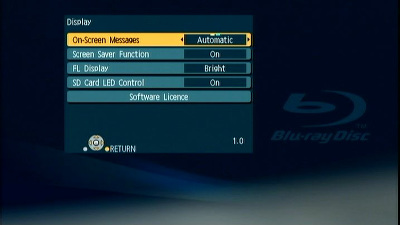
  2. Press the [SETUP] button on the remote control to open the display menu screen.
  3. Using the Up and Down cursor buttons on the remote control, select the "DISPLAY" tab - "DISPLAY" items will appear.
  4. Press and hold the [STATUS] button on the remote control. While doing so, the current firmware version for your player will be displayed in the lower right hand corner of the screen (e.g. "1.0" in my set it shown 1.2) .

    Please make note of this version number.


Step 2. Checking the latest firmware version available for your BD player

Confirm the latest firmware version that is available for "the Model Number of your BD player" by referencing the "Update Information" section provided above (near the top of this page).

Please compare this firmware version number to the version number of the firmware currently installed in your Panasonic BD player (the firmware currently installed in your Panasonic BD player was checked in "Step 1").

  • If the version of the firmware installed on your Panasonic BD player and the latest firmware version available are the same
    >>No update is necessary.
  • If the version of the firmware installed on your Panasonic BD player is lower than the latest version available
    >>Updating is recommended - Please continue to step 3

Note:

The firmware for your Panasonic BD player may not need to be updated even though a firmware update has been released - for example.

  • If your Panasonic BD player was manufactured after the firmware was released and the firmware update has already been installed.
  • If your Panasonic BD player was serviced by an authorized Panasonic service technician the player was updated with the latest firmware.
Before u can go to the following steps u need to agree to the 'agreement'.

Main Contents begins from here.


Support

DMP-BD30 Firmware Download (Oceania/Thai, S.E.Asia)

Step 4. Firmware decompression

Check the file size of the downloaded file and decompress it. Supported for Windows only.

  1. Checking the file size.
    Right click on the downloaded firmware, "UPDATE_BD30G_V21.exe" and select "Properties". Make sure that the size of the file is the same as the size listed on the download page.

    If the file size differs, please download it again. After checking the size, click [OK] and the "Properties" window will close.

  2. Decompressing the file
    Double click the downloaded firmware "UPDATE_BD30G_V21.exe" and decompress it.
    The decompressed file will be named "PANA_DVD.FRM".

File size is 24,310,931 bytes. (UPDATE_BD30G_V21.exe)

Note:
You will not be able to install firmware designated for a region that is different to the region in which you purchased your Panasonic BD player.


Step 5. Create a firmware update disc

To create a firmware update disc, write the decompressed file to a CD-R disc using CD-R writing software. Follow the operating instructions for the writing software to create the disc. Once the firmware update disc is created, continue to the next step.

1.About the CD-R disc:
If the firmware update disc has write errors, it will not be readable by the Panasonic BD player and you will not be able to update the firmware.

Always use a blank CD-R disc. Do not use a CD-RW disc.

2.About the CD-R writing software:
If you are creating the firmware update disc on a Microsoft Windows PC, we recommend using the standard Windows XP writing application.

Other writing software can be used, but please follow the operating instructions provided for the writing software. Please be aware that "packet-writing" is not supported ( in my case I use Nero data writting, worked perfectly the first time. Do remember to 'unzip' the download file so that it become PANA_DVD.FRM, this is the data u need to burn onto a new blank CD disk) .

Step 6. Install the firmware update

[CAUTION]:

It will take about 10 minutes to update the firmware. During the firmware update procedure, do not turn the Panasonic BD player off nor disconnect AC power. Do not press any buttons,except as instructed ( in my set it took about 9 minutes ).

Failure to do so may result in the Panasonic BD player becoming unresponsive which will require repair.


[Step-1]

Turn your Panasonic BD player on.

[Step-2]

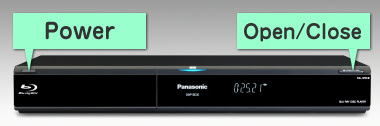
Press [OPEN/CLOSE] on the Panasonic BD Player to open the disc tray. Load the firmware update disc and press [OPEN/CLOSE] on the Panasonic BD Player to close the disc tray.
DO NOT press any other buttons during the firmware update.
The Panasonic BD Player will first display "Bye" on the front panel display, automatically turn itself off and then, within a few seconds, restart again and automatically start installing the firmware from the firmware update disc.


NOTE: If the Panasonic BD Player does not restart automatically after it has turned off, please press [POWER] on the Panasonic BD Player - the Panasonic BD Player will then restart and install the firmware update as normal.


[Step-3]

The time to complete the firmware update will vary, however the time should not exceed 15 minutes. Please be patient during the firmware upgrade!

NOTE: During the update process, various messages will show on the front panel display of the Panasonic BD player.


[Step-4]

When the firmware update is completed, "FINISH" is displayed on the front panel display of the Panasonic BD player and the disc tray opens automatically.
Please take out the firmware update disc and turn off power with the power button on the main unit. The firmware update installation procedure is now complete.


Please take out the firmware update disc and turn off power with the power button on the Panasonic BD player.

[CAUTION]
  • During the firmware update procedure, do not turn the unit off, disconnect it from AC power (outlet) and press any buttons except as instructed.
    Failure to do so may result in an unresponsive unit that will require repair ( now if u have a TV set with HDMI control enable, switching off the Plasma/LCD MIGHT switch off the BD player when all this updating is on going, so it is a good idea to just left it on & don't touch any buttons when all this updating is going on! ).

[Note]:

If the firmware version currently installed in the Panasonic BD player is the same or more recent than the firmware version on the update disc, "UNSUP/PORT" will be displayed for approximately 5 seconds on the front display of the Panasonic BD player. In this case, an update is unnecessary -please remove the disc.

Display on the Panasonic BD player:

If you have any problems after installing the new firmware, please contact the Global Service Center Network.

Well after doing all the above my set now show ver 2.1. To me not much different at all in my set operation & function. Actually I do this firmware updateing as my set cannot read some DVD ( ahem ahem vision ) which is playerable on DVD player, so it seem that my BD30 is 'sensitive' to some badly recorded DVD.

To my dear readers who own a Panasonic BD30 blu ray player u can give a a try but only if u r familia & confident or else it is best to ask Panasonic do do it.

Thursday, January 8, 2009

Chinese New Year & Chinese Oranges. Look Before U Eat!

Chinese New Year is drawing near. When buy Chinese oranges please beware of the worms inside, look carefully! These worms are very similar to the texture of the orange and therefore can only be observe if you look carefully (long sighted person may not notice).

The Chinese government had in fact made effort to destroy hundreds of tons of these oranges and compensate the farmers for these. But however some culprit may still sell it illegally. That's why we need to be careful.

Whether the worms is harmful to the human body or not is still questionable. But generally if few numbers are consumed it should not make any harm according to doctors. It is advisable to be careful about it.


Well after looking at the above pictures my dear readers, what is do u think? As for me I think I have to look carefully before I poke all this oranges into my mouth! He! He! Normally I just poke whatever food I like into my mouth without much thinking! Ah! I think I have to be very careful when I eat this oranges from now on! So if u do see any visitors during this CNY visit examining this oranges before eating it might be b'cos of the worm inside & not b'cos they r rude!

Hemmmmm! It seem that China product is really no safe! First milk now oranges! What next? Well wishing all my dear readers a very Happy & Prosperous Chinese New Year! :)